Essential cookies keep the site running. With your OK we also use optional ones to understand how the site is used and make it better. See our Cookie Policy.
Your choice is kept for 12 months.
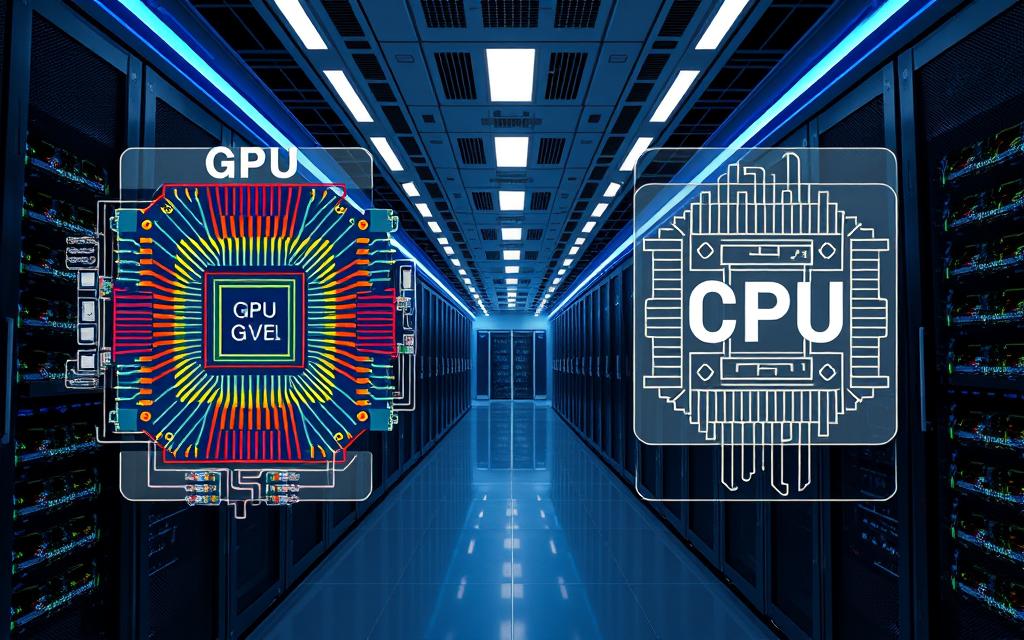
Modern data centers need a deep understanding of hardware design. As workloads get more complex, engineers must choose wisely to keep performance high. Choosing the right processor is now a big decision.
The rise of AI & HPC has changed how we deliver processing power. These tasks need special hardware, unlike traditional servers. Engineers must balance speed with system efficiency.
This change also affects the Digital Infrastructure of the facility. With more power, advanced Cooling is key to avoid hardware failure. Knowing these differences helps teams build strong environments for future computing needs.
Key Takeaways:
The heart of any strong digital setup is the choice between central and graphics processors. Engineers need to pick the right parts for their needs. Knowing these basics helps teams meet the growing needs of Artificial Intelligence and complex data tasks.
A Central Processing Unit, or CPU, is the main brain of a computer. It’s great at sequential processing, handling tasks one at a time. This makes it perfect for general computing, operating systems, and quick decision-making.
A Graphics Processing Unit, or GPU, is all about parallel processing. It was once just for graphics, but now it’s key for High Performance Computing. Its power is what drives the complex math in Artificial Intelligence today.
The main difference is how they handle workloads. CPUs focus on quick, single tasks, while GPUs handle lots of data at once. Knowing this is crucial for building scalable systems.
| Feature | CPU | GPU |
|---|---|---|
| Primary Design | Sequential Processing | Parallel Processing |
| Core Count | Few, powerful cores | Thousands of smaller cores |
| Best Use Case | General-purpose tasks | High Performance Computing |
Choosing the right hardware depends on what you need. For High Performance Computing, a mix of both is best. This way, data centers can handle all kinds of tasks efficiently.
Data centers use CPUs for their ability to handle complex tasks. CPUs are the main part of most business systems.
CPUs are great because they have low latency and high speeds. They do well with tasks that need to be done one after another.
CPUs also have smart branch prediction and big caches. This makes them very flexible. They can handle many tasks in Data Centers without needing to change hardware often.
CPUs are best for tasks that need high single-thread performance. They run operating systems, manage databases, and handle business software.
They are also key for virtualization. CPUs help run many virtual machines. This keeps Data Centers running smoothly and efficiently.
Engineers need to watch certain numbers to make sure servers work well. They look at core count, thermal design power, and memory bandwidth.
By checking these, they can spot problems before they slow things down. Here’s a table with important numbers for CPU performance in Data Centers.
| Metric | Description | Impact on Performance |
|---|---|---|
| Clock Speed | Frequency of cycles per second | High impact on serial task speed |
| Core Count | Number of independent processing units | Crucial for multi-threaded workloads |
| Cache Size | On-chip memory storage | Reduces latency for data access |
| TDP | Thermal Design Power | Determines cooling and energy needs |
Graphics Processing Units have changed from simple tools to the core of today’s computing. They handle big data tasks that old hardware can’t. This change helps companies use High Performance Computing to lead in a data-rich world.
GPUs are strong because they can process lots of tasks at once. Unlike regular processors, they have thousands of small cores for fast calculations. This makes them great for big data.
By using GPUs, engineers can make systems faster and more stable. This efficiency is key for keeping servers running smoothly.
GPUs power AI & HPC in companies. They help train deep learning models quickly. They also help with scientific tasks like weather forecasting and molecular modeling.
These tasks need to process huge amounts of data fast. Without GPUs, they’d take a long time. So, GPUs are now a must for advanced analytics.
Choosing the right hardware depends on the data center’s needs. CPUs are good for complex tasks, while GPUs are better for lots of tasks at once. Knowing this helps engineers set up better systems.
| Feature | CPU Performance | GPU Performance |
|---|---|---|
| Core Count | Low (High-speed cores) | High (Thousands of cores) |
| Task Type | Serial Processing | Parallel Processing |
| Primary Use | General Computing | AI & HPC Workloads |
| Latency | Low for single tasks | Higher for single tasks |
In summary, using GPUs and CPUs together is smart. This mix meets High Performance Computing needs while keeping systems flexible. By matching hardware with tasks, data centers run at their best.
As servers get more packed, old cooling methods can’t keep up. Modern data centers need advanced thermal management to keep high-performance gear running smoothly. Without it, heat can cause big drops in performance and even damage hardware.
Data centers use air and liquid cooling systems to stay stable. Old server cooling methods, like CRAC units, work well for less dense setups. But they can’t handle today’s high-compute racks.
So, many are switching to liquid cooling. This method uses coolant right at the chip or rack level. It’s key for handling the huge heat loads from modern processors.
To boost energy efficiency, data centers need a complete design overhaul. Using hot and cold aisle containment is a big step. It stops air mixing and cuts down on cooling work.
Teams should also use real-time monitoring to spot thermal issues early. This lets them adjust airflow to keep energy efficiency high. Regular upkeep keeps the facility running well and saves costs.
GPU clusters are a special challenge for thermal management. They produce a lot of heat during AI tasks. If it gets too hot, the GPUs slow down to avoid damage.
So, server cooling is crucial for GPU-heavy setups. Advanced liquid cooling lets GPUs run at top speed for longer. This keeps expensive hardware in good shape for longer.
Managing power consumption is a big challenge for today’s facility operators. As more hardware is packed into smaller spaces, the cost of electricity becomes a major concern. This is true for those running Data Centers.
Choosing between CPUs and GPUs is a trade-off. GPUs handle parallel tasks better but use more power than CPUs.
Engineers need to look at the Energy Efficiency of each part based on the task. For AI tasks, a GPU might be worth the extra power. But for general tasks, a CPU could be cheaper.
Good power management is key for a green environment. Facility managers should watch and control electricity use across all hardware.
These steps help Data Centers stay efficient and keep hardware cool. Regular checks help find and fix any waste before it costs too much.
Calculating Total Cost of Ownership (TCO) means looking at more than just the initial cost. You must also consider ongoing costs like electricity, cooling, and maintenance.
When figuring out TCO, think about these things:
By understanding these costs, engineers can make smart choices. They can balance short-term needs with long-term savings. This way, Data Centers stay up-to-date and financially sound.
Artificial Intelligence is now more than just a workload. It’s becoming the main driver for managing complex data center environments. By adding intelligence to the infrastructure, engineers can reach new levels of efficiency that were once impossible.
Modern facilities use predictive analytics to spot hardware failures before they happen. They watch telemetry data in real-time. This lets them adjust resources to avoid bottlenecks.
Automated workload balancing makes sure tasks go to the most efficient hardware. This keeps throughput high and reduces stress on parts. The main benefits are:
Cooling is a big part of costs in large facilities. AI-Driven Cooling Solutions change this by adjusting fan speeds and coolant flow based on thermal maps.
These systems learn a room’s thermal profile for precise temperature control. They optimize airflow to lower power usage effectiveness (PUE) scores. This move to automated thermal management is key for stable operations in dense server racks.
The mix of AI & HPC is changing what’s possible in computing. As these technologies merge, we’ll see self-healing infrastructure that adapts to needs without human help.
Future advancements will focus on better hardware-software teamwork. This will help data centers grow and support more complex research and business needs.
Modern data centers need a strong base to handle today’s tech demands. They must support high-performance hardware with careful planning. A solid Digital Infrastructure is key for smooth and secure data flow.
Stability is crucial for top-notch data centers. High-capacity hardware like GPUs produce a lot of heat. They need steady power to avoid failures or downtime.
Engineers focus on redundant power and top-notch cooling. Reliable hardware and software tools protect data and keep systems running. This lets teams innovate without constant issues.
AI facilities need a forward-thinking design. AI tasks require lots of processing power, so special rack setups are needed. Designers should aim for modular layouts for easy upgrades.
Good cooling is vital for AI. AI gear produces a lot of heat, so liquid cooling or advanced air systems are key. Starting with these solutions helps avoid future problems.
Scalability lets data centers grow with business needs. Engineers should check current capacity and plan for the future. They look at power, network, and space for more servers.
A scalable Digital Infrastructure can adapt to new needs without major changes. Modular parts help grow operations step by step. This approach keeps costs down and performance high.
Switching to high-performance hardware is more than just buying new gear. Modern Data Centers face big challenges when adding new processing units. They must check if they’re ready for the change before fully adopting it.
Upgrading to GPU systems is expensive. Costs include the hardware itself and extra expenses like power and cooling. These capital expenditures can be a big strain if not planned carefully.
Running high-density clusters also increases operational costs. Data center managers need to check their power capacity to avoid high bills. Using energy-efficient hardware can help manage these costs over time.
Many companies struggle with the lack of skills needed to manage new hardware. IT staff may know standard servers but not parallel computing. This skills gap can lead to wasted resources and downtime.
To overcome this, companies should invest in training for their teams. Working with external experts can also help. Having a skilled workforce is key to staying competitive in Data Centers.
Adding new hardware often causes software conflicts. It’s crucial to ensure apps work well with new GPU drivers. Engineers need to make sure software is ready for parallel processing to get the best performance.
Standardizing hardware can help avoid these problems. Using containers and virtualization can also reduce risks. The table below shows common challenges and their effects on operations.
| Challenge Category | Primary Impact | Risk Level | Mitigation Strategy |
|---|---|---|---|
| Hardware Costs | Budget Overruns | High | Phased Rollout |
| Technical Expertise | Operational Delays | Medium | Staff Training |
| Software Compatibility | System Instability | High | Containerization |
| Power Infrastructure | Thermal Throttling | Medium | Cooling Upgrades |
The world of data center hardware is changing fast. Engineers are moving away from old designs to meet today’s demands. They aim for better efficiency and more computing power in less space.
Chiplet technology and 3D stacking are changing how we build processors. By splitting different parts onto smaller chips, engineers can make better chips and save money. These changes also help with Thermal Management by making it easier to cool the chips.
Also, putting high-bandwidth memory right on the processor is becoming common. This cuts down on data delays, which is key for high-performance computing. These updates help keep hardware running smoothly, even when it’s working hard.
Hybrid processors are becoming popular. They mix the flexibility of a CPU with the power of a GPU. This makes systems simpler and more efficient, saving space in data centers.
Using one package for both logic and graphics makes power delivery easier. This is great for AI workloads that need fast data processing. Hybrid solutions are making servers more versatile and efficient.
Experts think we’ll see more specialized silicon for different industries. As software gets more complex, hardware needs to keep up. This means data centers will need better Thermal Management to handle more power in less space.
| Technology Trend | Primary Benefit | Impact on Cooling |
|---|---|---|
| Chiplet Design | Improved Yields | Enhanced Thermal Management |
| Hybrid Processors | Reduced Footprint | Simplified Airflow |
| 3D Stacking | Higher Density | Advanced Heat Dissipation |
The success of a modern data center depends a lot on the partnerships with hardware makers. Choosing the right partner is more than just buying stuff. It’s a key decision that affects how well the whole place works for years.
When picking hardware providers, engineers need to look at more than just how fast things run. It’s crucial to see how well a maker supports Liquid Cooling. This is key for places with lots of equipment.
Top vendors should give detailed guides and tech help for their gear. Reliability and steady supply chains are also big deals when picking a major player.
Good relationships with hardware makers help keep a data center stable. With Liquid Cooling systems, having a vendor that gets the integration issues can save a lot of time and money.
Working together means quicker fixes and updates. This keeps the setup strong against new tech needs.
Data center managers should look for vendors with a clear plan for the future. A good partner should grow with the facility, making sure new upgrades fit with what’s already there.
The aim is to create a sustainable ecosystem where the vendor feels like part of the team. Spending time on these choices now will save a lot of trouble and money later.
Modern data center management needs a proactive approach. Engineers must balance high-performance computing with tight budgets. This balance keeps them competitive.
Technical landscapes change fast with new releases from NVIDIA and Intel. Engineers should invest in certifications and training. This keeps them up-to-date with the latest hardware trends.
Strong vendor relationships offer critical support and early product insights. Good communication helps solve integration problems quickly. Reliable vendors share Server Cooling best practices to protect investments.
Energy efficiency and thermal management standards evolve with technology. Engineers must keep up with these changes. Regular audits help find and fix performance issues, ensuring the facility runs smoothly.
Following the industry, hunting a role or hiring for one: one account opens all of it.
Enter your email or username and we'll send you a secure link to set a new password.
Discussion